
常見問題 Q&A
教資中心網站:https://cfd.kmu.edu.tw/index.php/zh-tw/
中文版(English version is below)
Q1. 為何我無法在數位學習平台報名教學助理基礎培訓課程?
A1. 因為您選擇了錯誤的課程,請確認您選的課程為【教資中心-教學助理基礎培訓課程 TLDRC Teaching assistant Training course】
請至教資中心網站à教學型兼任助理à教學型兼任助理報到系統à下載操作手冊,請務必詳閱說明。
備註:測驗通過為 80 分
-----------------------------------------------------------------------------------------
Q2. 請問我要去哪裡簽合約?請問該如何報到?
A2. 114-2起採線上簽核作業:請至教資中心網站à教學型兼任助理à教學型兼任助理報到系統à下載操作手冊,請務必詳閱說明
-----------------------------------------------------------------------------------------
Q3. 為何我通過測驗了,但是校務系統仍顯示尚未通過?
A3. 因為測驗通過後,須等待審核確認後才會將合格資料轉入(並非及時轉入資料),轉檔時間為每個工作天早上9點進行,請於翌日早上9點後查詢。
-----------------------------------------------------------------------------------------
Q4. 請問要如何取得TA/ATA證號?
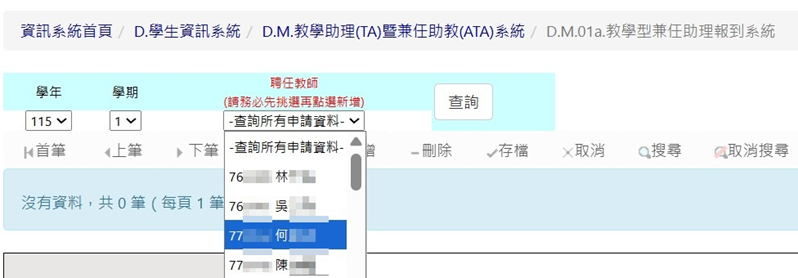
A4. 必須先至數位學習平台修讀「教資中心-教學助理基礎培訓課程 TLDRC Teaching assistant Training course」課程,課程及影片需全部修讀完畢,方可至測驗區測驗,滿80分即可通過,後續請於翌日早上9點後至WAC系統「D.M.01a.教學型兼任助理報到系統」查看。
-----------------------------------------------------------------------------------------
Q5. 教資中心審核確認步驟完成後,是否會主動通知學生?
A5. 目前不會,須請您定時查詢系統,可至WAC系統「D.M.00.修改E-mail及電話」查看是否審核完畢,審核通過就會有TA證號。

-----------------------------------------------------------------------------------------
Q6. 如何知道工作合約製作完成?
A6. 請至「Q.6.0.02.計畫人員(差勤、簽到退、請假、薪資查詢及合約電子簽署) 」 查詢。
-----------------------------------------------------------------------------------------
Q7. TA/ATA申請及報到流程需要在甚麼時候全部完成?
A7. 本學期TA/ATA申請及報到流程,請務必於115/09/21前完成,以利後續相關審核及投保程序之進行。
-----------------------------------------------------------------------------------------
Q8. 請問合約簽一份就可以了嗎 ?
A8. 每學年度第1學期須簽署兩份合約,第2學期則簽署一份合約,請同學務必確實完成合約簽署作業。
-----------------------------------------------------------------------------------------
Q9. 如何完成簽署合約的動作?
A9.
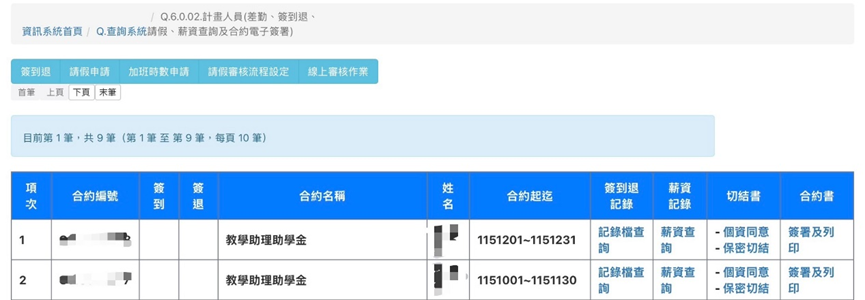
Step1: 請至WAC系統中的D.6.0.02.計畫人員(差勤、簽到退、請假、薪資查詢及合約電子簽署),找到圖中的兩筆合約,確認合約名稱與起訖日期是否有問題,若確認無誤,點選最右側的「簽署及列印」。
(附圖為TA的合約,若同學的身分為ATA,合約名稱會是兼任助教助學金,兩份合約的起迄日會分別為1151001~1151231以及1160101~1160131,請同學再仔細確認。)
Step2: 進入之後,找到合約的最下方會長這樣
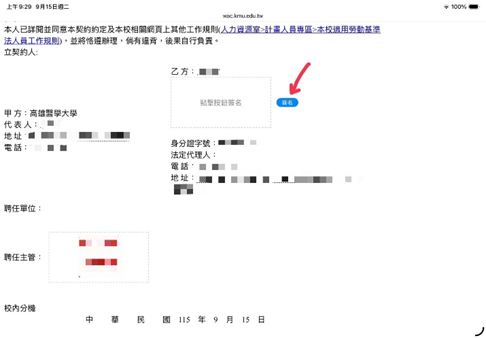
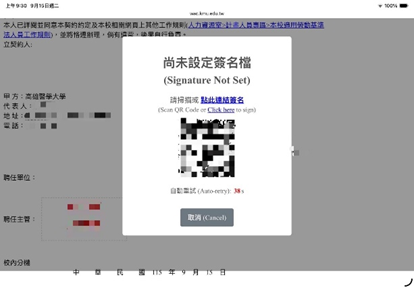
確認乙方的姓名、身分證字號,及其他基本資料都沒有問題的話,點選藍色的簽名按鈕,就會跳出以下的簽名連結,可以點選點此連結簽名,也可以掃QRcode。
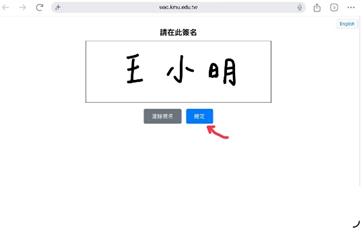
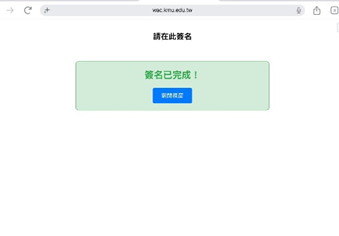
Step3: 接著畫面會跳轉到簽名的畫布(如下圖),簽完之後按下確定,就會出現「簽名已完成!」的畫面,此時可以關閉視窗,回到剛才的合約畫面,會出現選擇簽名檔,此時點選剛才的簽名,並按下確認送出,即完成合約的簽署。
------------------------------------------------------------------------------------------
Q10. 擔任TA/ATA需要什麼資格?
A10. 須為本校在校學生,經授課老師同意後,須先完成TA/ATA申請及報到流程,完成課程及測驗後,再到WAC系統「D.M.01a.教學型兼任助理報到系統」完成報到程序,待授課老師審核確認之後,方可擔任本課堂之TA/ATA。
-----------------------------------------------------------------------------------------
Q11. 擔任TA/ATA有何限制?
A11. 擔任TA/ATA不得為本課堂修課之學生,若經查獲屬實,將終止TA/ATA資格並且影響日後擔任TA / ATA之權利。
-----------------------------------------------------------------------------------------
Q12. 請問為何我的合約已簽屬完畢,卻仍然無法至WAC系統「D.M.03.工作紀錄表-工作明細」填報工時?
A12. 工作紀錄表平台將於合約開始日起(10/1)開啟,請於10/1之後自行撥空填報。
-----------------------------------------------------------------------------------------
Q13. 我完成合約簽署之後,看到如下圖的彈出訊息,請問我下一步該做什麼?
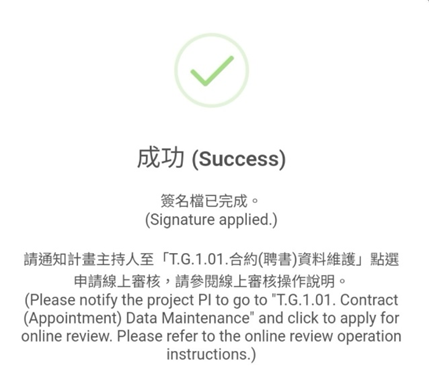
A13. 只要看訊息有顯示「簽名檔已完成」,即可忽略此訊息並關閉畫面,後面的程序會由教資中心處理。
-----------------------------------------------------------------------------------------
Q14. 我聽說教學助理需要在擔任期間完成進階培訓課程,請問我可以去哪裡看到?
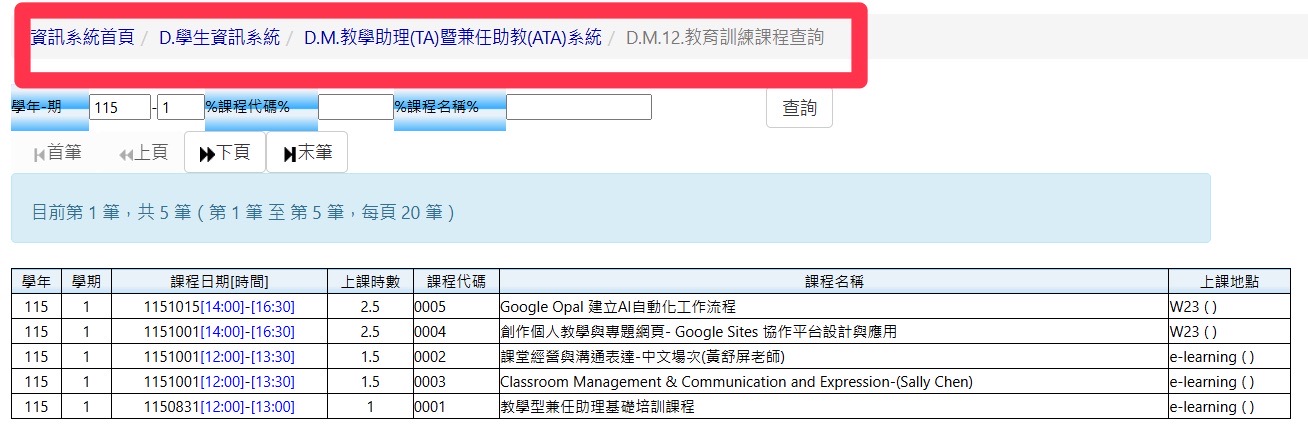
A14. 請至WAC系統上找到如附圖的路徑:

若想查詢本學期有開設的課程,請至「D.M.12.教育訓練課程查詢」,其中「課堂經營與溝通表達」為必修(中文或英文皆可),課程已放置在e-learning上,上完會有測驗,請於2026/10/31之前完成;除了此線上課外,同學還須參加至少一堂實體培訓課程(校內或跨校皆可)。
若同學是擔任EMI課程的TA,請於實體培訓課程中選擇EMI的課程,才算有完成當學期進階培訓。
~其他課程陸續開課中~
若想查詢自己的進階培訓課程修課進度,請至「D.M.11.教育訓練個人紀錄」

僑生、外籍簽約時請檢附居留證及工作證以PDF格式將電子檔 email 至 cfd@kmu.edu.tw 信箱,檔案要有學號姓名,未傳送者或檔案格式不符合者無法進行簽約流程。
English version
Q1. Why am I unable to register on the E-Learning Platform?
A1. This is likely because you have selected the wrong course. Please ensure you have selected: 【教資中心-教學助理基礎培訓課程 TLDRC Teaching assistant Training course】.Note: Please visit the TLDRC website >教學型兼任 助理>教學型兼任助理報到系統 to download and carefully read the Operation Manual.
-----------------------------------------------------------------------------------------
Q2: Where do I sign the contract? How do I complete the onboarding process?
A2. Starting from the 2nd Semester of the 114th Academic Year, all procedures are handled via the Online Signing System.Please go to the TLDRC website>教學型 兼任助理>教學型兼任助理報到系統 to download the Operation Manual for step-by-step instructions
-----------------------------------------------------------------------------------------
Q3: Why does the school system still show that I haven't passed, even though I completed the test?
A3. After passing the test, the qualified documents will be transferred after review and confirmation (not immediately). The transfer time is 9:00 AM every working day. Please check after 9:00 AM the following day.
-----------------------------------------------------------------------------------------
Q4: How can I obtain a TA/ATA certificate number?
A4: You must first complete the “Teaching Assistant Basic Training Course” at the Teaching Resource Center on the e-learning website. All courses and videos must be fully completed . You must ensure your test score is greater than 80. Then please check the "D.M.01a. Teaching-Type Part-Time Assistant Registration System" in the WAC system after 09:00 the following morning.
-----------------------------------------------------------------------------------------
Q5. Is the step of the Teacher Resource Center Review and Confirmation be conducted by notifying the TA/ATA student after they finish?
A5. Currently, the system does not send out automatic notifications. But you can check your TA ID in WAC system: D.M.00.
-----------------------------------------------------------------------------------------
Q6: How do I know if my work contract has been completed?
A6: Please check Q.6.0.02. Planning Personnel (Attendance, Sign-in/Leave, Leave, Salary Inquiry, and Electronic Contract Signing).
-----------------------------------------------------------------------------------------
Q7: When do the TA/ATA application and registration process need to be completed in full?
A7: Please complete the TA/ATA application and registration process for this semester before 115/09/21 to facilitate subsequent review and insurance procedures.
-----------------------------------------------------------------------------------------
Q8: Is one contract sufficient?
A8: Two contracts will be signed in the first semester, and one contract in the second semester. Please make sure that all students complete the contract signing assignment.
-----------------------------------------------------------------------------------------
Q9. How do I complete the signing of the contract?
A9.
Step 1: In the WAC system, go to Q.6.0.02.Project Personnel Attendance System (Sign-in/Sign-out, Leave Request) and Wages Inquiry, find the two contracts shown in the image, and confirm that the contract names and start and end dates are correct. If everything is correct, click " Contract Signing and Printing" on the far right.
(What the image shows is the TA contract. If the student's status is ATA, the contract title will be "兼任助教助學金". The start and end dates of the two contracts will be 1151001~1151231 and 1160101~1160131 respectively. Please check carefully.)
Step2: After entering the contract, scroll directly to the bottom.
If you confirm that the second party's name, ID number, and other basic information are correct, click the blue signature button. The following signature link will pop up. You can click this link to sign or scan the QR code.
Step 3: The screen will then jump to the signature canvas (as shown in the picture below).
After signing, press OK, and the screen "Signing completed!" will appear. At this time, you can close the window and return to the contract screen.
You will then be prompted to select a signature file. Select the signature you just selected and press OK to submit. This completes the signing of the contract.
-----------------------------------------------------------------------------------------
Q10: What qualifications does a TA/ATA have?
A10: You must be a current student of this university. After obtaining the instructor’s consent, first complete the TA/ATA application and registration process, and after completing the course and assessment, proceed to D. M.01a. The teaching-type part-time assistant registration system completes the registration process. Only after the instructor’s approval can the student serve as the TA/ATA for this class.
-----------------------------------------------------------------------------------------
Q11: What are the restrictions for TA/ATA?
A11:TA/ATA are not allowed to tutor students in this class. If this is found to be true, TA/ATA qualifications will be terminated and future TA/ATA duties will be affected.
-----------------------------------------------------------------------------------------
Q12. May I ask why, even though my contract has been fully signed, I still cannot access the WAC system "D. M.03. Work Record Form - Work Details” to upload my working hours?
A12. The Work Record Sheet platform will open on the contract start date (10/1). Please schedule and submit your records after 10/1.
**The test Passing score: 80%
-----------------------------------------------------------------------------------------
Q13. After I signed the contract, I saw a pop-up message as shown in the image below. What should I do next?
A13. Once you see a message that says "Signature applied", you can ignore the message and close the screen. The subsequent procedures will be handled by the Center for Educational Resources.
-----------------------------------------------------------------------------------------
Q14. I heard that TAs are required to complete advanced training courses during their term. Where can I find this information?
A14. Please find the path shown in the attached image on the WAC system:
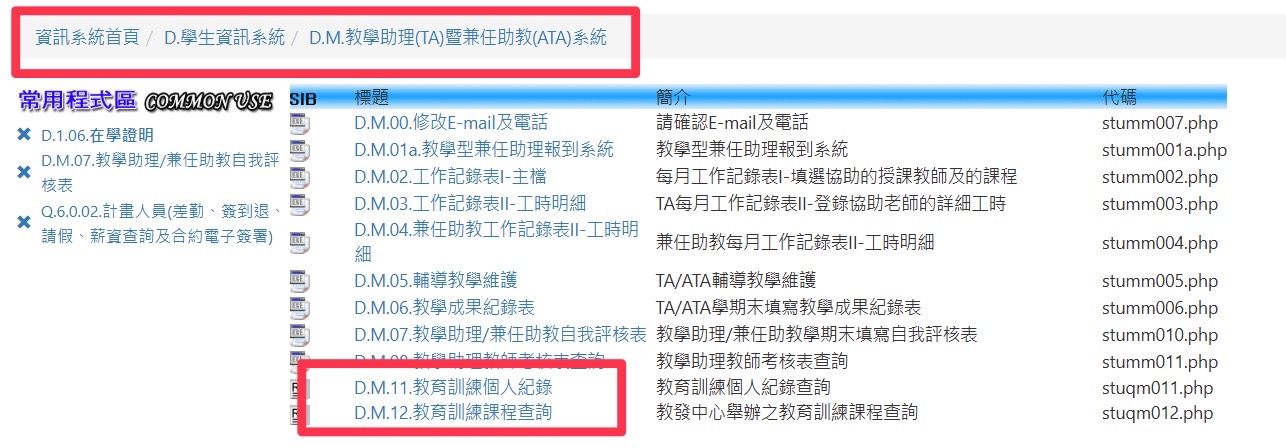
To find out which courses are opened this semester, please go to "D.M.12. Education and Training Course Inquiry". "Classroom Management and Communication" is a required course (Chinese or English is acceptable). The course is available online and will include a quiz upon completion and should be done before October 31, 2026. In addition to this online course, students must attend at least one in-person training course (either on campus or at another campus).
If you are a TA for the EMI course, please select the EMI course in the in-person training sessions to complete the advanced training for that semester.
~Other courses are starting soon~
To check your progress in advanced training courses, please go to "D.M.11. Personal Education and Training Records".
**Overseas Chinese and international students:
Before signing the contract, please send your residence permit and work permit in PDF format to cfd@kmu.edu.tw . Please include your student ID number and name in the subject line.